Update Dec 2017:
In a recent update to SONAR, Cakewalk added a feature called “Ripple Editing”. It doesn’t actually help with the problem described below, which still exists in the 2017.10 release of SONAR.
Original Post:
So I have this project – “Working the Paradigm Shift” – that is mixed 7/8 and 4/4 time signatures. Cakewalk SONAR is largely a great product but I feel that it does let us down in the area of time line editing. Here’s an example, and a work-around:
In this section of the project, I have a series of 7/8 bars followed by a 4/4 bar. Whilst practicing the keyboard solo, I realize that one of those 7/8 bars also needs to be 4/4 as well.
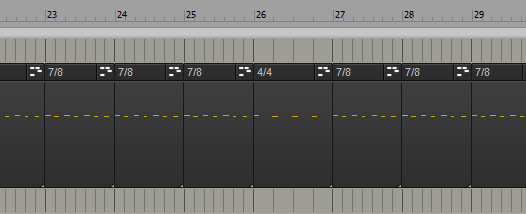
However, if I change Bar 24 from 7/8 to 4/4, all the subsequent clips change their musical position:
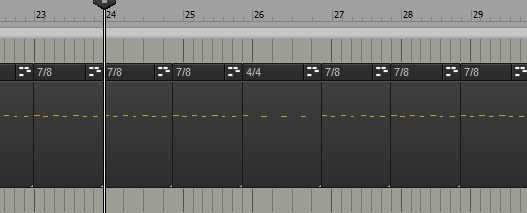
Notice the clips in bar 25,26,27 etc are now all offset. Clearly this is not what I want. I’m showing the click track here to make it very obvious what the problem is.
I don’t know why this should happen. After all, the clips use the default time base of “Musical”; they are not locked to absolute time or anything tricky like that.
OK, so let’s UNDO the time signature change, and try locking the clips first:
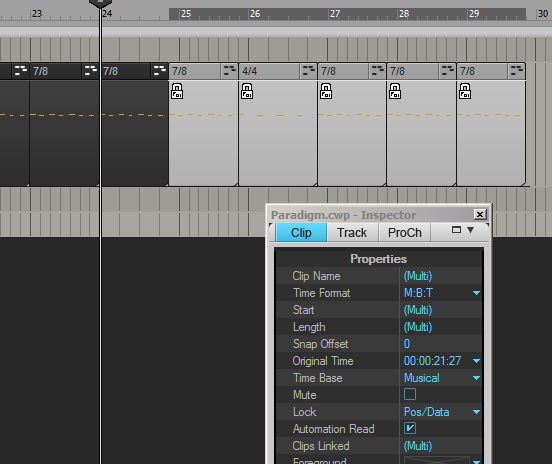
Nope, that still didn’t work. In fact, even though the clips are “locked” to “Musical” time base, they still slip into the previous bar.
I don’t think the clips should need to be locked at all; but even if they do, the SONAR documentation seems to indicate that the clips should not be changing their musical M:B:T position, if they are locked:
If the clip is set to the Musical time base, the clip’s M:B:T position stays constant, and its Absolute position shifts. If the clip is set to the Absolute time base, the position does not move, but its M:B:T position shifts
So… this could be a bug, or perhaps I am missing something. I’ll raise that with Cakewalk Support, but for now, here’s the work-around:
Work-around:
1. Ensure that Bar 25 is set to 7/8, over-riding the default/previous bar time signature.
2. At Bar 24, insert 1 measure in the time line:
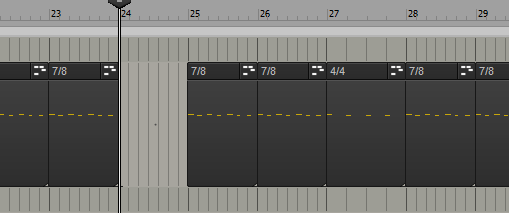
Inserting a measure like this does not corrupt the subsequent clips’ M:B:T position. This is expected and known behavior.
3. Change the time signature of the new Bar 24 to 4/4:
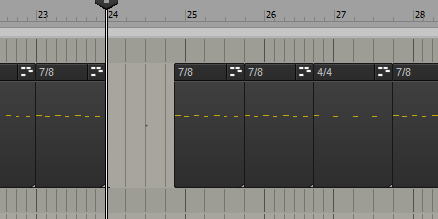
Observe:
- The original bar 24 (now bar 25) is inheriting the 4/4 time signature from new bar 24;
- The subsequent clips have changed their M:B:T position, as we would expect, given what we observed earlier.
4. Change the time signature of Bar 25 to 6/8:
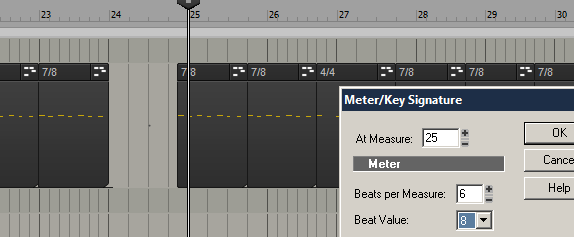
This should cause the later clips to re-align with the bars, because 7/8 + 7/8 = 4/4 + 6/8:
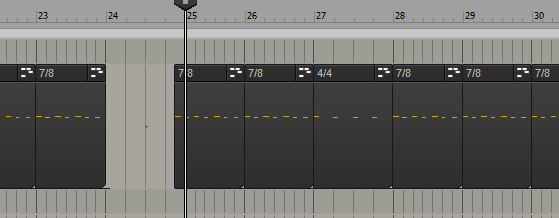
Observe:
The “7/8” clip in bar 25 is wrong, but a) we don’t care about it, and b) all the other subsequent clips are correctly aligned.
Now we can remove the “extra” 7/8 bar 25 from the time-line. This actually involves a known work-around for another issue, which is that you can’t delete a bar from the time-line unless there is even data in the section you want to delete. Fortunately for us, we have a clip we don’t need:
5. Re-size the “7/8” clip so that it is nicely situation within the bar boundary.
6. Ensure Snap-To-Beat (whole note is advisable) is enabled
7. Press Ctrl-A to select ALL TRACKS
8. Select the entirety of Bar 25, and select Edit > Delete Special from the menu.
9. Select all options, especially “Delete Hole” and “Shift by Whole Measures”:
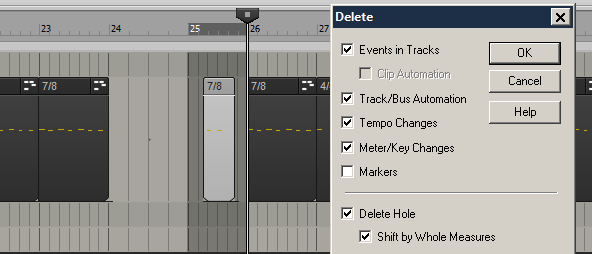
10. Click OK.
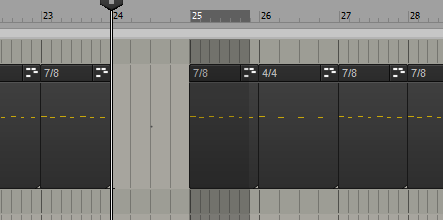
Bar 25 should now be removed, and now we have a Bar 24 in 4/4 and the rest of the project continues as it did before we started editing.
IN MY OPINION, THIS IS TOO DAMN COMPLICATED and should be addressed in a future version of SONAR. (Updated – see above)
Recent Comments